General configuration
The widget visualizes the capabilities of a DASF Backend module based on the
websocket URL and the topic you enter. For this, it is using the
dasf-webcomponent library.
You can either select the entire module (default), or only a specific class or
a specific function in the widget.
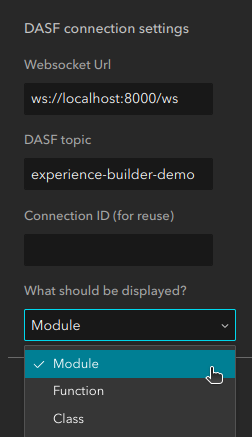
If you decide to only render a specific class of function and want to manually setup the widgets, you should think about defining a Connection ID that you then use in different widgets (enter the Connection ID in every widget that uses the same websocket URL). If you don’t, each widget will create it’s own websocket connection.
Loading options
It may take some time to establish a connection to the DASF backend module. In that case, you might want to display a message to the user that the connection is about to be established. This can be done using the loading options settings

Here you can either display an animation using ESRIs Loading component, and/or enter a message that is displayed to the user while loading.