Default Calls
You can configure the DASF widget to make calls to the backend module right after the connection to the backend module has been established, without the need for user interaction. This is particularly useful if you want to populate the frontend with some initial content provided by the backend module. A standard use case would be to visualize the version of the DASF backend module.
Example workflow
An example workflow is demonstrated using the function
dasf_exb:dasf_exb.backend.default_content() in our
demo project. We use this to
populate a data source default_content that is connected to one of ESRIs
text widgets. Once the connection is establed, the frontend makes a call to the
backend module with
{ "func_name": "default_content" }
and the backend module returns content for the data source
def default_content() -> DataSource:
    return DataSource(
        name="default_content",
        records=[{"text": "Some default generated content by the backend."}],
    )
This data source is listened by a Text widget in the experience builder
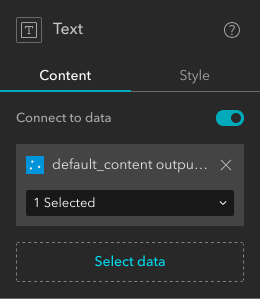 .
.
Configuration of default calls
To create a default call, click the DASF widget and navigate in the settings
sidebar to the section on Default Calls. Here you can now add and modify
default calls. Click the +-button next to Add new call

and populate the text field with the JSON-formatted content you want to send
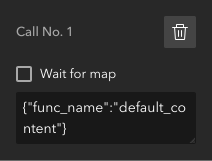
Optionally you can check the Wait for map option to make sure, the call is sent after the map has been loaded (in case you want to show data on a map).